Multilingual DTP QC · IDML in, IDML out

Catch every layout break in your translated InDesign files before the client sees the PDF proof.

Upload your translated IDMLs. Get back a per-page report of overset text, missing glyphs, wrong text direction, and corrupted tags — across every language version at once.

IDML in, IDML out · no InDesign licence · your INDD files are never touched

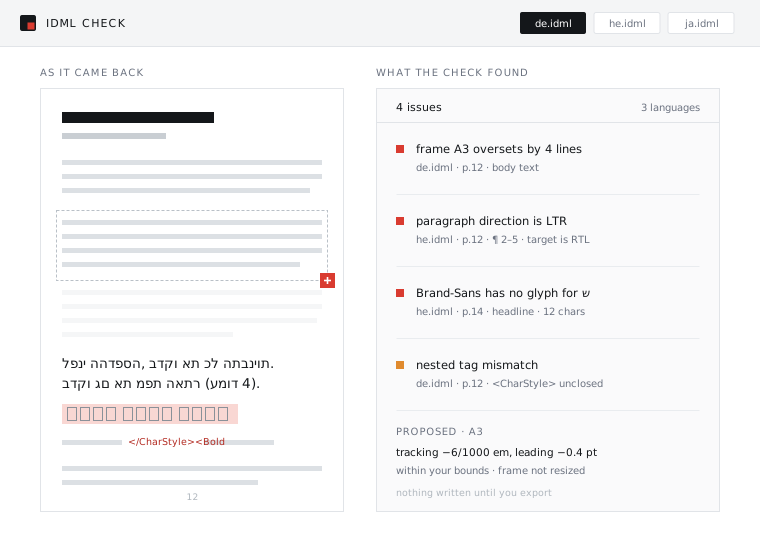
Left: a translated InDesign page with a red overset marker on a text frame, a Hebrew paragraph running left to right, and empty boxes where the brand font has no glyphs. Right: the IDML Check report listing each issue with its page and frame reference.

InDesign → IDML → CAT tool → back. And the layout is broken.

  • Text expansion. German runs about 30% longer than English. The text overflows the frame and vanishes. The CAT tool didn't see it. The translator didn't see it. It surfaces on the client's PDF proof.
  • RTL architecture. Hebrew and Arabic files come back laid out left-to-right, because paragraph direction is a separate setting from the language field. Punctuation mirrors the wrong way.
  • Missing glyphs. The brand font has no Cyrillic, no CJK, no Hebrew. The layout is technically correct and completely unreadable.
  • Tag corruption. Manual formatting overrides in the source become nested inline tags in the IDML, and CAT tools mangle them.
  • Without this step, the fix is a person opening every page of every language version and working through it by hand.

How it works

Three steps, and none of them involve opening InDesign

1

Upload

Drop in your translated IDMLs — every language at once. No InDesign licence, nothing to install, the IDML is parsed directly. Whatever came out of Trados, Phrase or memoQ goes straight in.

2

Review

A per-issue list with the page and the frame identified. "Frame A3 oversets by 4 lines." "Paragraph direction is LTR on a Hebrew target." "Brand-Sans has no glyph for ש." Each issue carries a proposed fix, held inside the bounds you set.

3

Export

Repaired IDMLs, plus a QC report you can hand to the client: what was found, what changed, and what was deliberately left alone. Your INDD originals were never part of it.

Every language in one pass

de.idml, he.idml and ja.idml go in together and get compared against each other, so a frame that only breaks in German is obvious rather than buried. That cross-language pass is the part InDesign's Preflight has no concept of.

Bounds you set once

Maximum tracking adjustment, maximum leading change, whether a frame may resize at all. Nothing outside those bounds gets touched, and everything inside them is listed.

A report you can hand over

Per page, per frame, per issue: what was found, what changed, what was left alone. It's the artefact to send when a client asks whether the Arabic version has been checked.

Why now

This problem is growing because of AI, not shrinking

Four dated, sourced facts. This section is deliberately short, because we are not going to pad it with anything we can't point at.

vendor rate guide · april 2026

$1–3 per page, before the RTL premium

Specialist vendors price DTP-only work at US$1–3 per page. Arabic, Hebrew, Farsi and Urdu carry roughly a 30% premium; CJK about 25%. A 100-page document into five languages is 500 pages of DTP work — per revision cycle.

industry report · june 2026

Nothing upstream can catch it

Overset text, RTL architecture and accessibility tagging cannot be caught or fixed by translators, reviewers, or TMS automation. They require a specialist at the end of the pipeline. That is the structural reason this cost never quite goes away.

industry report · june 2026

AI handles text, not layout

Enterprise adoption of AI translation is near-universal, and the gap between TMS output and a finished multilingual document is not closing. Faster translation pipelines produce layout problems faster.

adobe · 2026

Flex Layout doesn't cover this

InDesign's 2026 Flex Layout does not handle text expansion, RTL document logic, or mixed-script typography. The gap at the end of the localization pipeline is still open.

Where this sits

Nothing else in the pipeline owns this step

Preflight is in-app and single-file. The TMS owns the text and treats layout as out of scope. That boundary is exactly where the cost leaks.

InDesign PreflightYour TMSDTP hoursIDML Check
Knows what the target language is
Reads every language version in one pass
Flags overset text
Flags wrong RTL paragraph direction
Flags missing glyphs
Repairs, not just reports
Needs an InDesign licenceyesnotheirsno
Priced perincludedwordpagepage

The DTP column is not a competitor. A specialist is still the person who decides whether a headline can afford to lose a line — this removes the first four hours of their day, the mechanical pass, not the judgment.

Pricing

The linter is free. The repairs are the paid part.

Upload as much as you like and read every report for nothing. You pay per page only when IDML Check writes a repaired file.

Repair

$0.10/ page

Proposed fixes, applied within your bounds, exported back as IDML.

  • Everything in the free linter
  • A proposed fix per issue
  • Your brand-safe bounds, enforced
  • Repaired IDMLs plus a client-ready QC report
  • Flat monthly tier for agencies running constant volume

Priced per page because that is the unit you already quote in, and set roughly an order of magnitude under the $1–3 per page that specialist DTP-only work is priced at. Repairs are charged on pages written, not pages uploaded — a page the linter clears costs nothing.

The actual objections

Do I need an InDesign licence to use this?

No. The IDML is parsed directly, so nothing has to open in InDesign and there is nothing to install. That is also why it runs across twelve language versions at once instead of one document at a time.

Do you touch my source INDD files?

No. IDML in, IDML out. Your originals are never uploaded, never read and never modified.

Is my content confidential? What is the retention window?

Files are processed and then deleted within 24 hours of the run, and nothing you upload is used to train anything. The QC report stays available to you until you delete it, and it can be exported and the record removed at any point. We know this one is not negotiable: an LSP under client NDAs cannot upload a pharmaceutical catalogue to a service with a vague privacy paragraph, so the window is a stated number rather than a promise to be reasonable.

Does it work with Trados, Phrase or memoQ output?

Yes. It takes whatever IDML comes out of the far end of your pipeline. It is tool-agnostic by design — it reads the file format, not your TMS.

Will it break my carefully built layout?

You set the bounds — maximum tracking adjustment, maximum leading change, whether a frame is allowed to resize at all. Nothing exceeds them, and every single change is listed in the report, so a repaired file can be diffed against what you sent.

What about RTL specifically?

It is a first-class case, not an afterthought. Paragraph direction being LTR on a Hebrew or Arabic target is one of the checks that runs by default, precisely because it is the failure that is invisible to everyone upstream and obvious to the client. The Hebrew version of this page is right-to-left for the same reason.

What about CJK?

Supported, with an honest caveat: line-breaking rules differ, so overset detection for Japanese, Chinese and Korean runs more conservatively than for Latin script. It flags borderline frames rather than quietly passing them, which means a few more items to look at on a CJK job.